


Other cookies are configurable.
How to Use YouTube in 2026: Stream Faster, Watch Anywhere, Stay Private
YouTube is the largest video platform in the world and the default place where billions of people learn, watch, and unwind. Tutorials, deep-dive video essays, live sports, music, breaking news, full-length documentaries, gameplay, indie films — almost everything ends up on YouTube eventually. For most users it has quietly replaced cable, talk radio, and a chunk of search.
But the way YouTube actually performs day to day depends on a lot of things you do not see: your ISP’s peering with Google, the load on the closest CDN node, whether your provider is quietly throttling video traffic, how a hotel router treats streaming, and which country’s content library Google thinks you are in. This guide explains how to get the most out of YouTube in 2026 — smoother playback, full 4K and 8K, stable livestreams, access to videos that say “not available in your country”, and the privacy steps most people skip.
Why YouTube became the default video platform
It is hard to overstate how much YouTube has absorbed into one app. Where a previous generation switched between cable, a CD player, a DVR, and a separate radio, today a single tab does all of it. That is why optimizing the YouTube experience pays off across so many parts of your day.
- Universal library. Live news from every major broadcaster, full music catalogs, every popular podcast, every game tutorial, every cooking technique — if it has been filmed in the last twenty years, it is probably on YouTube.
- Adaptive quality from 144p to 8K. The same video can stream cleanly on a flaky LTE connection or saturate a gigabit fiber line at 8K HDR. The catch is that the player picks quality based on what the network can sustain — if your connection is slow or throttled, you get the blurry version even though the source is pristine.
- Live sports, esports, and creator streams. Livestreams require steady throughput and low latency. Any congestion or packet loss shows up immediately as buffering circles and dropped resolution.
- YouTube Music + Premium. Background playback, offline downloads, ad-free viewing, and the full Music catalog turn a single Premium subscription into a replacement for Spotify plus a media player plus an ad blocker.
- Cross-device sync. Watch history, subscriptions, and “watch later” sync across phone, laptop, smart TV, console, and car — which means each of those devices is also reporting back what you watch.
The trade-off, like with any cloud service, is that getting the best version of YouTube depends on the quality and privacy of the network you are on. Most people never think about that until a long flight, a sketchy hotel network, or a video that just refuses to load past 480p.
The privacy and access risks most people don’t think about
YouTube traffic is encrypted between your device and Google — nobody on the network can read the video itself. But three things still leak out, and they all matter more than people realize.
Your ISP knows what you stream and when
U.S. internet providers can legally collect and monetize browsing metadata. They cannot read the video, but they can absolutely see that you watched YouTube, for how long, on which device, and how much bandwidth it consumed — and combine that profile with everything else you do online.
ISP throttling and peak-hour shaping
Some providers slow down video traffic during peak hours, when their network is congested, or when you exceed an unannounced soft cap. The result is a 1080p video that suddenly drops to 360p around 8 PM and recovers at 2 AM — not a YouTube problem, a routing problem.
Geo-restricted videos
A surprising amount of YouTube content is region-locked: music videos, sports highlights, indie films, and old TV uploads. The “This video isn’t available in your country” message is the licensing system at work, and it is keyed off the IP address you connect from.
Travel networks and country blocks
YouTube is fully blocked in several countries (China, Iran, North Korea, Turkmenistan, parts of others), heavily filtered in some, and unstable on cruise ships, planes, and hotel networks worldwide. Without a VPN, a single overseas trip can mean losing YouTube for the duration.
None of this means YouTube is unsafe. It means YouTube is a normal cloud service whose performance and access depend on the network around it. Two changes — a VPN on top of the connection and a few account settings — close almost every gap a regular viewer actually faces.
How a VPN improves your YouTube experience
A VPN does two things that matter for video streaming. First, it wraps every connection your device makes inside an encrypted tunnel, so the local network and your ISP can no longer single out video traffic to throttle or log. Second, it replaces the IP address Google sees with the IP of the VPN server you choose — which fixes a long list of geographic and routing problems.
Beats ISP throttling
Once your traffic is inside an encrypted tunnel, your ISP cannot tell video apart from anything else — so it cannot selectively slow it down. Many users see 1080p suddenly stop dropping to 360p the moment a VPN comes online.
Direct peering to Google’s CDN
Maximum VPN’s nodes sit in data centers with fast, direct peering to Google’s edge network. When the closest CDN node to your home is overloaded, routing through a less-congested VPN endpoint often delivers higher sustained throughput than the open path.
Unlocks geo-restricted videos
By picking a VPN server in a different country, you can watch the music videos, sports highlights, and creator content that says “not available in your country” back home. Routinely useful for fans of international sports and global music releases.
Works on hotel, plane, and cafe Wi-Fi
Captive portals, conference networks, and travel Wi-Fi often block or aggressively throttle YouTube. An encrypted tunnel sidesteps both: the network just sees an opaque connection to a VPN server and lets it through.
Not every VPN is good at this. A surprising number of services run such oversold infrastructure that a single 1080p stream brings the connection to its knees. The VPN you actually want for YouTube is one that has real bandwidth on every server, direct peering with Google, and no traffic caps — otherwise you are just trading one bottleneck for another.
Why simpler tools fall short
Before reaching for a VPN, a lot of users try lighter solutions first. Most of them solve a smaller problem than they appear to.
Public proxy servers
Free HTTP and SOCKS proxies forward traffic but are usually capped at 1–3 Mbps and overloaded by thousands of strangers. That is enough for thumbnails, not for HD video. The proxy operator can also see everything you do, and most public proxies have no transparency about who runs them.
Alternative DNS servers (8.8.8.8, 1.1.1.1)
Switching DNS does not affect video streaming throughput. DNS only resolves domain names — it does not change which path your packets take or whether your ISP is throttling them. Useful for some specific ISP-level blocks, useless against actual bandwidth shaping.
Free VPNs from the app stores
Most free VPNs cap traffic at 300–500 MB per day. A single 1080p hour eats most of that; 4K eats it in five minutes. Several free VPNs have also been caught logging traffic and selling browsing data — they are not really “free” in any meaningful sense.
Browser-based VPN extensions
Browser extensions only protect what runs in that one browser tab. They do nothing for the YouTube app on your phone, the smart TV app, or the console app on the same Wi-Fi. They also tend to use generic protocols that public networks already throttle.
Paid VPN services with real bandwidth (NordVPN, ExpressVPN, Surfshark) work fine for streaming, but cost $8–13 per month. Maximum VPN was built specifically as the “always-on” layer this list keeps pointing at: a device-wide tunnel with no traffic limits, a proprietary obfuscated protocol that captive portals and corporate firewalls do not recognize, and a no-logs policy. It costs nothing, supports up to 10 devices on one account, and runs in the background without nagging you for upgrades.
How to set up Maximum VPN for YouTube
Setting Maximum VPN up does not require an account, an email address, or a payment method. The whole process happens inside Telegram and takes under a minute.
- Open the bot
Tap @MaximumVPN_official_bot in Telegram and press Start. There is no signup form — no email, no phone, no card. The bot creates your configuration on the fly. - Get your personal configuration
The bot generates a unique connection key tied to your device and picks a nearby high-bandwidth server automatically. Configurations are available for Android, iOS, Windows, macOS, Linux, and most smart TVs — pick the one matching the device you stream on. - Import the config into the app
Either copy the key or download the config file the bot sends you, then open it with the Maximum VPN app. The bot includes a step-by-step walkthrough with screenshots for each operating system.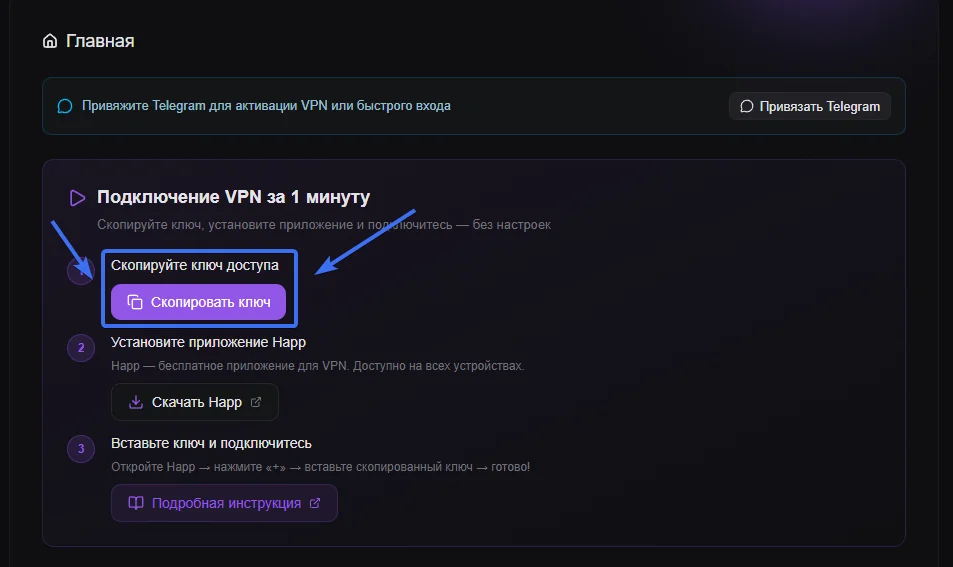
- Open YouTube and watch without buffering
Once the tunnel is up, launch the YouTube app or open youtube.com. Videos load straight into 1080p or 4K, livestreams stay stable, Shorts scroll smoothly, and YouTube Music plays without dropouts. The VPN runs in the background and does not affect the speed of other apps.
A few quick YouTube settings worth turning on while you’re in there: set video quality preference to Higher picture quality in the YouTube app (Settings → Video quality preferences) so the player uses the bandwidth a VPN gives you back; turn on Restricted Mode only if you actually want it — otherwise it can hide videos for no good reason; and review your YouTube History settings (myactivity.google.com) once a year to clear or pause logging if you care about what gets stored.
Why Maximum VPN is free
The fair question is why a service with this profile costs nothing. The honest answer is infrastructure. Maximum VPN runs on an automated server fleet that auto-scales capacity up and down with demand, retires under-used servers, and routes each user to the closest healthy node with the best peering. That cuts the operating cost of a connection by an order of magnitude compared with a traditional VPN provider that has to keep large fixed pools of capacity online 24/7.
Beyond the infrastructure, the project is supported by voluntary donations from its community. That model is what lets us keep the service free, unlimited, and ad-free — no “upgrade for full speed” pop-ups, no “your trial expires in 7 days” tricks, and no quietly selling traffic data behind the scenes. Privacy is the product, not the bait.
Frequently asked questions
Is YouTube safe to use in 2026?
YouTube itself is safe — Google encrypts video traffic with HTTPS and the platform has solid account protections. But your viewing history is logged to your Google account, your ISP can see that you are streaming and how much, and on public Wi-Fi anyone on the same network can see which services you connect to. A VPN closes those side channels by encrypting your traffic and replacing your IP with the VPN server’s.
Why does YouTube buffer or look blurry sometimes?
Three usual culprits. Network congestion: cafes, hotels, and cellular hotspots simply do not have enough bandwidth at peak hours. ISP throttling: some providers slow down video traffic during busy periods or when you exceed a soft cap. Geographic distance: if the closest Google CDN node is overloaded, your video is pulled from a farther data center. A VPN with fast servers and direct peering to Google bypasses the local bottleneck and often delivers smoother playback than the open connection.
What is the best VPN for YouTube?
The right VPN for YouTube has three properties: real bandwidth on every server (not just the “recommended” one), direct peering with Google’s CDN, and no logs. Maximum VPN runs more than 70 servers, including nodes with fast peering to YouTube’s edge network. It supports 4K and 8K without buffering, has no traffic limits, and is free with up to 10 devices per account — a strong default for everyday streaming.
Can I watch 4K through a free VPN?
Most free VPNs cap traffic at 300–500 MB per day, which is enough for 5–10 minutes of 4K — useless for actual viewing. Maximum VPN is structured differently: no traffic caps, no speed throttling, and high-bandwidth servers. 4K HDR plays without buffering, livestreams stay stable, and YouTube Music streams without dropouts.
Will a VPN slow down YouTube?
A high-quality VPN adds only a few milliseconds of latency, which is imperceptible during video playback. In some cases a VPN actually speeds up YouTube: when your ISP is throttling video traffic or when the local Google CDN node is congested, routing through a VPN with direct peering bypasses the bottleneck and delivers higher sustained throughput than the open connection.
Does YouTube Premium work through a VPN?
Yes. YouTube Premium is tied to your Google account, not to your IP address, so all Premium features — ad-free playback, background play, offline downloads, YouTube Music — keep working when a VPN is on. Some users also use a VPN to subscribe to Premium in regions with lower pricing, though Google has tightened that loophole over the years and may verify the billing region against your payment method.
YouTube without buffering
Set up Maximum VPN in under a minute. Free, no signup, no traffic caps. YouTube streams in 4K the way it’s supposed to, on any network you join.
Get Maximum VPN free