


Other cookies are configurable.
How to Use WhatsApp in 2026: Privacy, Calls Anywhere, and a Faster Setup
WhatsApp is the most-used messenger on the planet — over three billion people open it every month. For most users it has quietly absorbed family group chats, kid’s soccer-team coordination, contractor conversations, and an increasing slice of business communication. End-to-end encryption is on by default for every chat and call, which puts WhatsApp ahead of most messengers on raw security.
But the way WhatsApp actually performs day to day depends on a lot of things outside the app: whether the hotel Wi-Fi quietly blocks VoIP, whether the airport network throttles video calls, whether you are about to fly to a country that filters Meta services, and how much metadata your ISP is logging in the background. This guide walks through everything that quietly improves your WhatsApp experience — the privacy settings most people skip, why calls fail on certain networks, and the simple step that fixes both at once.
Why WhatsApp became the world’s default messenger
It is hard to overstate how much of daily communication has moved into WhatsApp. Where a previous generation used SMS, separate calling apps, and email for files, WhatsApp now does all of it in one app — and unlike most competitors, it works the same way across every country and every phone.
- End-to-end encryption by default. Every chat, every call, every photo, every document is encrypted between sender and recipient. Not even Meta can read them. This is the single biggest reason WhatsApp displaced SMS for sensitive conversations.
- Phone-number identity, no separate username. Anyone in your contacts list is automatically reachable. That trade-off — convenience for some privacy — is what made it spread so fast.
- Free voice and video calls worldwide. No long-distance charges, no carrier-specific apps, no awkward dial codes. A WhatsApp call from New York to Manila costs the same as one to the next room.
- Group chats, broadcast lists, communities. Up to 1,024 members per group, broadcast lists for one-to-many announcements, and Communities for organizing multiple groups around one topic.
- WhatsApp Web and desktop. The same chats sync to your laptop, so you can keep typing during a meeting without picking up your phone.
- Business features. WhatsApp Business gives small companies a verified profile, automated replies, and catalog support — one of the reasons WhatsApp has become the default customer-support channel in much of the world.
The trade-off, like with any cloud-connected messenger, is that using WhatsApp well depends on the network and account hygiene around it. Most people never think about that until a hotel Wi-Fi drops every call, until they realize their iCloud backup of WhatsApp messages is unencrypted, or until they fly somewhere that filters Meta services entirely.
The privacy and reliability gaps most people don’t notice
End-to-end encryption protects the contents of your messages and calls. It does not protect everything around them — and that is where most actual problems live.
Backups in the cloud are not E2E by default
If you back up your WhatsApp chats to iCloud or Google Drive without turning on End-to-End Encrypted Backup, the backup is encrypted only by Apple or Google — meaning a court order or a compromised account can expose every message you ever sent. The setting is one tap; most people have never opened it.
Voice and video calls leak your IP
Under default settings, WhatsApp uses peer-to-peer media for one-to-one calls, which means the other party’s app sees your real IP address. Group calls get relayed through Meta servers. Either way, a VPN replaces your real IP with the VPN server’s before any of that happens.
Hotel, airport and corporate networks block VoIP
A surprising number of public networks — hotels, airports, conference centers, cruise ships, even some corporate office Wi-Fi — explicitly block VoIP traffic. Calls drop after a few seconds, video freezes, voice notes refuse to play. The network, not WhatsApp, is the bottleneck.
Some countries block WhatsApp entirely
WhatsApp is fully blocked or has VoIP-only blocks in several countries you might travel through: UAE (voice and video calls blocked for telecom-licensing reasons), China, North Korea, Turkmenistan, and parts of others. Without a VPN, a single overseas trip can mean losing WhatsApp for the duration.
None of this means WhatsApp is unsafe. It means WhatsApp is a normal cloud-connected app whose availability and privacy depend on the network around it. Two changes — a VPN on top of the connection and a few account settings — close almost every gap a regular user actually faces.
How a VPN improves your WhatsApp experience
A VPN does two things that matter for WhatsApp. First, it wraps every connection your device makes inside an encrypted tunnel — including WhatsApp’s VoIP packets, message-sync traffic, and media uploads. Second, it replaces the IP address Meta and other apps see with the IP of the VPN server you choose. That single change quietly fixes a long list of small problems.
Calls work on hotel and airport Wi-Fi
The local network can no longer single out VoIP traffic to block, because everything is wrapped in an encrypted tunnel. Many users report calls suddenly working again the moment a VPN comes online — the difference between a working messenger and a brick.
Your real IP stays hidden
Whoever you call, whatever app sits on your phone next to WhatsApp, and any service that logs IPs sees the address of the VPN server — not your home, your phone’s carrier IP, or the hotel network you happen to be on. Useful for privacy, essential for safety on shared networks.
WhatsApp works while traveling
By picking a VPN server in a country where WhatsApp is fully available, you can keep using calls and Web from places where the local network filters Meta services. Routine for travelers to the UAE, China, and a handful of other destinations where WhatsApp would otherwise just stop working.
WhatsApp Web pairs cleanly
Aggressive corporate firewalls and captive portals sometimes block the QR-code sync handshake that pairs WhatsApp Web with your phone. An encrypted tunnel sidesteps the inspection — the handshake completes, chats sync, and the Web client just works.
Not every VPN handles VoIP well. A surprising number of services use generic protocols that public networks already recognize and throttle, or run such oversold infrastructure that calls drop after thirty seconds. The VPN you actually want for WhatsApp is one that looks like ordinary HTTPS traffic on the wire, has enough server capacity to carry stable voice and video calls, and does not log what you do.
Why simpler tools fall short
Before reaching for a VPN, a lot of users try lighter solutions. Most of them solve a smaller problem than they appear to.
WhatsApp’s built-in proxy
WhatsApp added a proxy setting a few years ago, and you can plug a community proxy address into Settings → Storage and Data → Proxy. The catch: it only routes WhatsApp’s text and media traffic, not voice or video calls. Public proxies also overload quickly and have no transparency about who runs them.
Switching DNS (1.1.1.1, 8.8.8.8)
Changing DNS only affects how domain names get resolved. It does not change which networks your packets travel over and does not unblock VoIP traffic that the local Wi-Fi router refuses to forward. Useful for a narrow set of ISP-level domain blocks, useless against actual port- or protocol-level filtering.
Free VPNs from the app stores
Most free VPNs cap traffic at 300–500 MB per day. WhatsApp video calls eat 20–50 MB per minute, so a single half-hour family call can blow the daily cap. Several free VPNs have also been caught logging traffic and selling browsing data — not really “free” in any meaningful sense.
Switching to a different messenger
Switching everyone you talk to onto Telegram or Signal is a real option for new conversations, but it does not bring back the years of WhatsApp history and contact list you already have. Most family and business contacts will not move just because your network is misbehaving in one location.
Paid VPN services with proper VoIP support (NordVPN, ExpressVPN, Surfshark) work fine, but cost $8–13 per month. Maximum VPN was built specifically as the “always-on” layer this list keeps pointing at: a device-wide tunnel with no traffic limits, a proprietary obfuscated protocol that captive portals and aggressive corporate firewalls do not recognize, and a no-logs policy. It costs nothing, supports up to 10 devices on one account, and runs in the background without nagging you for upgrades.
How to set up Maximum VPN for WhatsApp
Setting Maximum VPN up does not require an account, an email address, or a payment method. The whole process happens inside Telegram and takes under a minute.
- Open the bot
Tap @MaximumVPN_official_bot in Telegram and press Start. There is no signup form — no email, no phone, no card. The bot creates your configuration on the fly. Need help with Telegram first? See our how-to-use-Telegram guide. - Get your personal configuration
The bot generates a unique connection key tied to your device and picks a nearby high-bandwidth server automatically. Configurations are available for Android, iOS, Windows, macOS, and Linux — pick the one matching the device you message and call from most. - Import the config into the app
Either copy the key or download the config file the bot sends you, then open it with the Maximum VPN app. The bot includes a step-by-step walkthrough with screenshots for each operating system.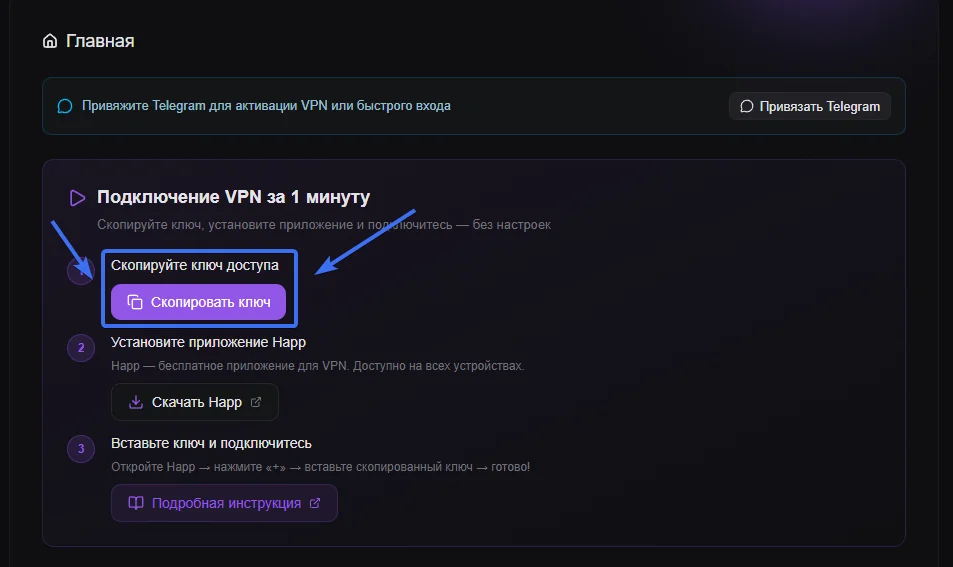
- Use WhatsApp normally — just safer
Once the tunnel is up, open WhatsApp on your phone or web.whatsapp.com on your laptop. Messages send instantly, voice and video calls stay stable, photos and documents transfer at full speed, voice notes play without buffering. The VPN runs in the background and does not affect the speed of other apps.
A few quick WhatsApp settings worth turning on while you’re in there: enable End-to-End Encrypted Backup (Settings → Chats → Chat Backup → End-to-end encrypted backup) so iCloud or Google Drive cannot read your history; turn on Two-Step Verification (Settings → Account → Two-step verification) so a stolen SIM cannot hijack your account; set Last Seen, Profile Photo, Status to My Contacts or Nobody; and review Linked Devices once a month to log out anything you don’t recognize. Five minutes, set once.
Why Maximum VPN is free
The fair question is why a service with this profile costs nothing. The honest answer is infrastructure. Maximum VPN runs on an automated server fleet that auto-scales capacity up and down with demand, retires under-used servers, and routes each user to the closest healthy node. That cuts the operating cost of a connection by an order of magnitude compared with a traditional VPN provider that has to keep large fixed pools of capacity online 24/7.
Beyond the infrastructure, the project is supported by voluntary donations from its community. That model is what lets us keep the service free, unlimited, and ad-free — no “upgrade for full speed” pop-ups, no “your trial expires in 7 days” tricks, and no quietly selling traffic data behind the scenes. Privacy is the product, not the bait.
Frequently asked questions
Is WhatsApp safe to use in 2026?
WhatsApp itself is safe — every chat and call is end-to-end encrypted by default, so even Meta cannot read them. The weak spots are around the chat: chat backups in iCloud or Google Drive are not end-to-end encrypted unless you turn that on, your IP is exposed during voice and video calls under default settings, and metadata about who you talk to is still visible to Meta. Two-step verification, encrypted backups, and a VPN on untrusted networks close almost every gap a regular user actually faces.
Why do WhatsApp calls fail on hotel and airport Wi-Fi?
Most hotels, airports, conference centers, and cruise ships explicitly block VoIP traffic — the kind WhatsApp uses for voice and video calls. The motivation is usually commercial (hotels still sell international phone calls) or technical (VoIP is bandwidth-heavy and gets capped first when the network is saturated). A VPN encrypts the call traffic so the network cannot single it out, which is why WhatsApp calls suddenly start working again the moment a VPN comes online.
What is the best VPN for WhatsApp?
The right VPN for WhatsApp has three properties: it handles VoIP traffic without dropping calls, it works on captive-portal networks that block standard protocols, and it does not log your activity. Maximum VPN uses a proprietary obfuscated protocol that looks like ordinary HTTPS to firewalls, supports stable voice and video calls on hotel and airport Wi-Fi, has no traffic limits, supports up to 10 devices per account, and is free.
Does WhatsApp Web work through a VPN?
Yes. web.whatsapp.com works fully through Maximum VPN. The Web client just talks to Meta’s servers via HTTPS, which the VPN tunnel carries cleanly. In some workplace networks the QR-code sync handshake gets blocked by aggressive corporate firewalls — connecting through a VPN routes around that and lets the Web client pair with your phone normally.
Is using a VPN with WhatsApp legal in the United States?
Yes. VPNs are fully legal in the United States and in most countries. Using a VPN to protect your privacy on WhatsApp, on public Wi-Fi, or while traveling is a standard security practice that the FTC has recommended for years. A VPN does not legalize otherwise illegal behavior, but choosing to encrypt your traffic is itself perfectly fine.
Will a VPN slow down WhatsApp?
A high-quality VPN adds only a few milliseconds of latency, which is imperceptible on calls and messages. In real-world conditions a VPN often makes WhatsApp faster: when the local network is throttling VoIP or congested, an encrypted tunnel sidesteps both problems. Maximum VPN automatically routes you to the closest, least-loaded server, so calls stay stable and large media files transfer at the full speed of the underlying connection.
WhatsApp without dropped calls
Set up Maximum VPN in under a minute. Free, no signup, no traffic caps. Voice and video calls stay stable on hotel Wi-Fi, airport hotspots, and every network you join while traveling.
Get Maximum VPN free